PokemonButton是受LikeButton和LikeAnimation的启发,类似Twitter的Like动画的一种实现。
具体效果图如下:
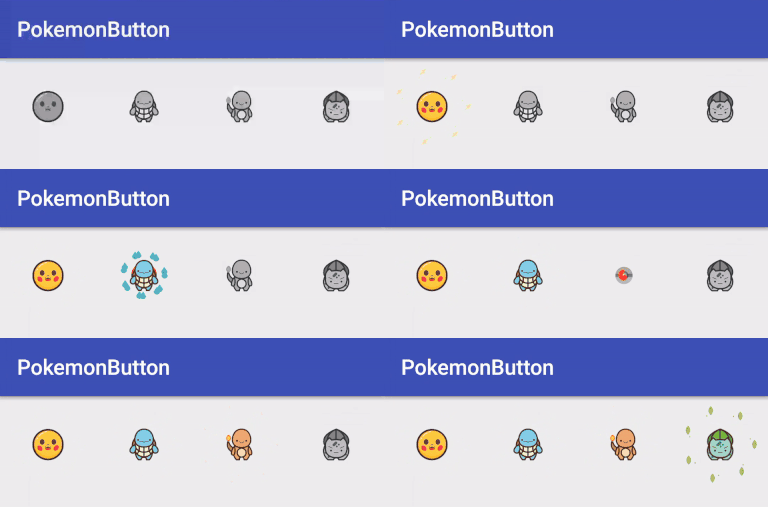
该动画效果是通过手动绘制和使用ObjectAnimator实现的,相较帧动画,这样的解决方案更为灵活。这篇文章只是一个简单的概述,如果想要知道更多的细节,可以在我的GitHub中查看源代码——PokemonButton。
PokemonButton是一个继承FrameLayout的View,该View托管三个ChildView - PokeBallView显示精灵球图形,ImageView显示精灵的Image,TypeView呈现与精灵属性相应的点缀效果图。
PokeBallView
这个View负责绘制精灵图标下面的精灵球图案。使用Paint和Path在Canvas上绘制:
@Override
protected void onDraw(Canvas canvas) {
    super.onDraw(canvas);
    tempCanvas.drawColor(0xffffff, PorterDuff.Mode.CLEAR);

    drawPokeBall(getWidth() / 2, getHeight() / 2, outerCircleRadiusProgress * maxCircleSize,tempCanvas);
    tempCanvas.drawCircle(getWidth() / 2, getHeight() / 2, innerCircleRadiusProgress * maxCircleSize +  paintBlack.getStrokeWidth(), maskPaint);
    canvas.drawBitmap(tempBitmap, 0, 0, null);
}整个View分为两层,外圈的精灵球图案以及内圈的擦除圆。
精灵球图案分为上半球、下半球以及轮廓的绘制:
public void drawPokeBall(float cx, float cy, float radius, Canvas canvas){
    RectF outerBall = new RectF(cx-radius, cy-radius, cx+radius, cy+radius);

    RectF innerBall = new RectF(cx-radius/3,cy-radius/3,cx + radius/3,cy + radius/3);

    pathTopBall.reset();
    pathBlack.reset();
    pathBottomBall.reset();

    pathTopBall.moveTo(cx - radius,cy);
    pathTopBall.lineTo(cx - radius/3,cy);
    pathTopBall.arcTo(new RectF(innerBall),180,180);
    pathTopBall.lineTo(cx + radius,cy);
    pathTopBall.arcTo(new RectF(outerBall),0,-180);
    pathTopBall.close();

    pathBottomBall.moveTo(cx - radius, cy);
    pathBottomBall.lineTo(cx - radius/3, cy);
    pathBottomBall.arcTo(new RectF(innerBall),180,-180);
    pathBottomBall.lineTo(cx + radius,cy);
    pathBottomBall.arcTo(new RectF(outerBall),0,180);
    pathBottomBall.close();

    pathBlack.moveTo(cx - radius, cy);
    pathBlack.lineTo(cx - radius/3,cy);
    pathBlack.moveTo(cx + radius/3, cy);
    pathBlack.lineTo(cx + radius, cy);

    canvas.drawPath(pathTopBall,paintTopBall);
    canvas.drawPath(pathBottomBall,paintBottomBall);
    canvas.drawPath(pathBlack,paintBlack);

    canvas.drawCircle(cx,cy,radius/3,paintBlack);
    canvas.drawCircle(cx,cy,radius,paintBlack);
}每个帧从清除整个画布开始,通过使用CLEAR模式的画笔。然后根据给定的进度绘制内圈和外圈:maskPaint.setXfermode(new PorterDuffXfermode(PorterDuff.Mode.CLEAR));
这就能产生一个透明孔由内向外扩大使精灵球图案消失的效果。
View所用的tempCanvas和tempBitmap是在这里定义的:
@Override
protected void onSizeChanged(int w, int h, int oldw, int oldh) {
    super.onSizeChanged(w, h, oldw, oldh);
    paintBlack.setStrokeWidth(w/20);
    maxCircleSize = w / 2 - (int)paintBlack.getStrokeWidth();
    tempBitmap = Bitmap.createBitmap(getWidth(), getWidth(), Bitmap.Config.ARGB_8888);
    tempCanvas = new Canvas(tempBitmap);
}除此之外,PokeBallView能根据当前的进展改变其颜色。由ArgbEvaluator完成:
private void updateCircleColor() {
    float colorProgress = (float) Utils.clamp(outerCircleRadiusProgress, 0.5, 1);
    colorProgress = (float) Utils.mapValueFromRangeToRange(colorProgress, 0.5f, 1f, 0f, 1f);
    this.paintTopBall.setColor((Integer) argbEvaluator.evaluate(colorProgress, 0, TOP_HALF_BALL_COLOR));
    this.paintBottomBall.setColor((Integer) argbEvaluator.evaluate(colorProgress, 0, BOTTOM_HALF_BALL_COLOR));
    this.paintBlack.setColor((Integer) argbEvaluator.evaluate(colorProgress, 0, BLACK_COLOR));
}
TypeView
这个类是呈现与精灵属性相应的点缀效果图的抽象类,和PokeBallView类似,在onDraw()中:
@Override
protected void onDraw(Canvas canvas) {
    drawOuterTypesFrame(canvas);
    drawInnerTypesFrame(canvas);
}

private void drawOuterTypesFrame(Canvas canvas) {
    for (int i = 0; i < TYPES_COUNT; i++) {
        int cX = (int) (centerX + currentRadius1 * Math.cos(i * OUTER_TYPES_POSITION_ANGLE * Math.PI / 180));
        int cY = (int) (centerY + currentRadius1 * Math.sin(i * OUTER_TYPES_POSITION_ANGLE * Math.PI / 180));
        drawType(cX, cY, currentTypeSize1, canvas);
    }
}

private void drawInnerTypesFrame(Canvas canvas) {
    for (int i = 0; i < TYPES_COUNT; i++) {
        int cX = (int) (centerX + currentRadius2 * Math.cos((i * OUTER_TYPES_POSITION_ANGLE - 10) * Math.PI / 180));
        int cY = (int) (centerY + currentRadius2 * Math.sin((i * OUTER_TYPES_POSITION_ANGLE - 10) * Math.PI / 180));
        drawType(cX, cY, currentTypeSize2, canvas);
    }
}
点缀效果是基于当前进度进行绘制的,它们排列在不可见圆上——位置由以下因素决定:
int cX = (int) (centerX + currentRadius1 * Math.cos(i * OUTER_TYPES_POSITION_ANGLE * Math.PI / 180));
int cY = (int) (centerY + currentRadius1 * Math.sin(i * OUTER_TYPES_POSITION_ANGLE * Math.PI / 180));具体的点缀效果绘制交由继承该类的具体实现来进行。以目前已经实现的四个效果之一的Electric为例。Electric需要实现该抽象类的四个抽象方法,分别为init()——进行绘制所需的初始化,drawType(float cx, float cy, float radius, Canvas canvas)——实际绘制,updateTypesPaints(float currentProgress)——根据当前进度调整画笔状态,updateTypesAlpha(int alpha)——根据当前进度调整画笔透明度。
Electric的相关实现如下:
@Override
protected void init() {

    paintElectric = new Paint();
    paintElectric.setAntiAlias(true);
    paintElectric.setStyle((Paint.Style.FILL));
}

@Override
protected void drawType(float cx, float cy, float radius, Canvas canvas) {
    pathElectric.reset();

    pathElectric.moveTo(cx - radius/2,cy - radius/4);
    pathElectric.lineTo(cx + radius,cy - 3*radius/4);
    pathElectric.lineTo(cx + radius/2,cy + radius/4);
    pathElectric.lineTo(cx + 3*radius/4,cy + 3*radius/8);
    pathElectric.lineTo(cx - 3*radius/4,cy + 7*radius/8);
    pathElectric.lineTo(cx - radius/4,cy);
    pathElectric.lineTo(cx - radius/2,cy - radius/4);

    canvas.drawPath(pathElectric,paintElectric);
}

@Override
protected void updateTypesPaints(float currentProgress) {
    if (currentProgress < 0.5f) {
        float progress = (float) Utils.mapValueFromRangeToRange(currentProgress, 0f, 0.5f, 0, 1f);
        paintElectric.setColor((Integer) argbEvaluator.evaluate(progress, COLOR_1, COLOR_2));
    } else {
        float progress = (float) Utils.mapValueFromRangeToRange(currentProgress, 0.5f, 1f, 0, 1f);
        paintElectric.setColor((Integer) argbEvaluator.evaluate(progress, COLOR_2, COLOR_3));

    }
}

@Override
protected void updateTypesAlpha(int alpha) {
    paintElectric.setAlpha(alpha);
}将TypeView设计为抽象类可以让我们在之后绘制新效果时只用关注于具体图案的绘制,实际上目前由于时间关系我只实现了四个属性效果,分别为Electric,Fire,Grass和Water,而在PokemonType中我预设了所有的精灵属性:
public enum  PokemonType {
    NORMAL,
    FIRE,
    FIGHTING,
    WATER,
    FLYING,
    GRASS,
    POSITION,
    ELECTRIC,
    GROUND,
    PSYCHIC,
    ROCK,
    ICE,
    BUG,
    DRAGON,
    GHOST,
    DARK,
    STEEL,
    FAIRY
}
PokemonButton
最终的ViewGroup由PokeballView,ImageView和动态生成的具体实现的TypeView组成。
最终的View动画由一些较小的动画组成,通过AnimatorSet一起播放:
animatorSet = new AnimatorSet();

ObjectAnimator outerCircleAnimator = ObjectAnimator.ofFloat(pokeBallView, pokeBallView.OUTER_CIRCLE_RADIUS_PROGRESS, 0.1f, 1f);
outerCircleAnimator.setDuration(250);
outerCircleAnimator.setInterpolator(DECCELERATE_INTERPOLATOR);

ObjectAnimator innerCircleAnimator = ObjectAnimator.ofFloat(pokeBallView, pokeBallView.INNER_CIRCLE_RADIUS_PROGRESS, 0.1f, 1f);
innerCircleAnimator.setDuration(200);
innerCircleAnimator.setStartDelay(200);
innerCircleAnimator.setInterpolator(DECCELERATE_INTERPOLATOR);

ObjectAnimator starScaleYAnimator = ObjectAnimator.ofFloat(icon, ImageView.SCALE_Y, 0.2f, 1f);
starScaleYAnimator.setDuration(350);
starScaleYAnimator.setStartDelay(250);
starScaleYAnimator.setInterpolator(OVERSHOOT_INTERPOLATOR);

ObjectAnimator starScaleXAnimator = ObjectAnimator.ofFloat(icon, ImageView.SCALE_X, 0.2f, 1f);
starScaleXAnimator.setDuration(350);
starScaleXAnimator.setStartDelay(250);
starScaleXAnimator.setInterpolator(OVERSHOOT_INTERPOLATOR);

ObjectAnimator dotsAnimator = ObjectAnimator.ofFloat(typeView, typeView.TYPES_PROGRESS, 0, 1f);
dotsAnimator.setDuration(900);
dotsAnimator.setStartDelay(50);
dotsAnimator.setInterpolator(ACCELERATE_DECELERATE_INTERPOLATOR);

animatorSet.playTogether(
        outerCircleAnimator,
        innerCircleAnimator,
        starScaleYAnimator,
        starScaleXAnimator,
        dotsAnimator
);

animatorSet.addListener(new AnimatorListenerAdapter() {
    @Override
    public void onAnimationCancel(Animator animation) {
        pokeBallView.setInnerCircleRadiusProgress(0);
        pokeBallView.setOuterCircleRadiusProgress(0);
        typeView.setCurrentProgress(0);
        icon.setScaleX(1);
        icon.setScaleY(1);
    }
});

animatorSet.start();当然,PokemonButton需要相应点击事件:
@Override
public boolean onTouchEvent(MotionEvent event) {
    if(!isEnabled)
        return true;

    switch (event.getAction()) {
        case MotionEvent.ACTION_DOWN:
            setPressed(true);
            break;

        case MotionEvent.ACTION_MOVE:
            float x = event.getX();
            float y = event.getY();
            boolean isInside = (x > 0 && x < getWidth() && y > 0 && y < getHeight());
            if (isPressed() != isInside) {
                setPressed(isInside);
            }
            break;

        case MotionEvent.ACTION_UP:
            icon.animate().scaleX(0.7f).scaleY(0.7f).setDuration(150).setInterpolator(DECCELERATE_INTERPOLATOR);
            icon.animate().scaleX(1).scaleY(1).setInterpolator(DECCELERATE_INTERPOLATOR);
            if (isPressed()) {
                performClick();
                setPressed(false);
            }
            break;
    }
    return true;
}